“No results found” means a shopper searched your store and got zero matching products back. It usually comes down to one of three things: a typo or unfamiliar synonym, a product that’s out of stock or unpublished, or a search that doesn’t look in the field the shopper used — like a SKU. On Shopify, it’s often that last one: the native predictive search only checks a few fields by default. The good news is that most no-results pages are fixable — and a well-designed one can still recover the sale.
Imagine a customer walks into your physical store searching for a specific product, only to be met with empty shelves. They would likely feel frustrated, turn around, and leave. Now, translate this scenario to your online store. This is exactly what happens every time a customer’s search query leads them to a "no results found" page. Industry research suggests that as many as 15% of on-site searches can end this way.
When a customer uses your store’s internal search, they have high purchase intent. But when their query returns an empty page, that intent evaporates. Many users will instantly abandon your website, and only a few will attempt to refine their search.
This article will show you how to transform your "no results" page from a frustrating dead-end into a powerful conversion opportunity. We'll cover why this page is so critical, the common causes of search failures, and proven best practices to keep visitors engaged and guide them toward a sale.
What is a "No Results" Page?
A no results page (also known as a zero results page or search error page) is a web page displayed when a website’s internal search engine cannot find any relevant results for a user's query. While it technically signals a search failure, it doesn't have to be the end of the customer journey. With proper optimization, you can transform these roadblocks into meaningful opportunities that engage and redirect users to new discoveries.
Why Optimizing the No Results Page is Critical for UX and CRO
Only about 2.17% of visits to an average online store result in a sale. With such narrow margins, you cannot afford to waste a single conversion opportunity. When visitors can't find what they're looking for, they get annoyed. They’ve wasted their time and now face initiating a new search that might also be unsuccessful. This poor user experience (UX) directly leads to higher bounce rates and a staggering loss of potential revenue for your business.
A visitor who leaves in frustration will possibly never return. This is the worst-case scenario for any e-commerce business. The goal is to reframe this page not as a failure, but as a recovery mechanism. By giving users a helpful alternative path to explore, you minimize these incidents, enhance the overall customer journey, and protect your conversion rate optimization (CRO) efforts.
Common Causes of No Results Pages
Understanding why users encounter a zero results page is the first step to preventing them. It could be that the visitor misspelled the product, the page is being updated, or you simply don’t have that product in stock. Here are the most common reasons in detail.
Cause of "No Results"
Problem Description
Examples & Scenarios
Recommended Solution
Limited or Outdated Inventory
The on-site search index is not synchronized with real-time inventory levels. Products that are out of stock, discontinued, or no longer available are not correctly represented in the search, leading to a "No Results Found" page.
A user searches for a product that just went out of stock, but the search index hasn't updated yet.
- Implement real-time synchronization between the search index and inventory levels.
- Set up automatic alerts to restock popular items.
- Configure the search to recommend similar, in-stock products as alternatives.
Basic On-Site Search Functionality
Default e-commerce search engines (e.g., Shopify's native search) lack advanced features. They require exact keyword matches and cannot understand context, synonyms, or nuances in user queries, making it difficult for visitors to find items without the precise product title.
A user searches for "summer dress," but the product is titled "sundress." A basic search fails to connect these synonyms.
Upgrade from the default platform search to a more powerful, "intelligent" third-party search tool that understands natural language, context, and synonyms.
Incorrect or Incomplete Product Tags
E-commerce platforms rely heavily on product tags for filtering and search functions. If these tags are inconsistent, incorrect, or missing, products will be excluded from relevant search results.
A user searches for "running shoes," but the desired product is only tagged as "sneakers" and is therefore missed by the search.
Implement and maintain a universal, comprehensive, and consistent tagging system across the entire product catalog to ensure search accuracy.
User Misspellings and Typos
Simple typing errors, especially common for users on mobile devices, will lead directly to a dead-end page if the search engine does not have corrective features. This is one of the most frequent causes of failed searches.
A user types “iphne” instead of “iPhone,” or "witer jaket" instead of "winter jacket."
Implement an intelligent search solution that features typo tolerance, auto-correct functionality, or provides "Did you mean...?" suggestions.
Poorly Configured Search Filters
Filters are overly restrictive. When a user's filter combination (e.g., size, color, brand) doesn't yield an exact match, a basic search bar shows "No Results" instead of helpfully suggesting alternatives or partial matches.
A customer filters for a “men’s large red shirt.” The shirt is available in medium, but the search returns "No Results" instead of showing the available sizes for that product.
Configure the search and filters to be more helpful. Instead of showing nothing, the search should suggest available sizes, color options, or other closely related products.
Technical Issues and Theme Conflicts
Customizing an e-commerce theme (e.g., modifying files, changing the search bar's location) can inadvertently disrupt or break the underlying search logic and functionality if not done correctly.
A developer modifies theme files to change the site's layout and unknowingly breaks the code that calls the search function, leading to errors.
Conduct deep and thorough testing of all search functionalities (including filtering and auto-complete) immediately after any theme customization or modification is made.
Region-Specific Inventory Settings
Products are intentionally restricted by location due to shipping limitations or regional licensing agreements. While this is a deliberate business rule, it still creates a "no results" experience for users in those specific regions.
A user in Europe searches for a product that is only licensed for sale in North America and is correctly hidden from their search results.
This is intentional, so the solution is to manage user expectations. Use clear messaging to inform customers why a product is unavailable in their location.
How to Fix “No Results” on Shopify (Step by Step)
Most Shopify no-results pages trace back to a handful of fixable causes. Work through these in order:
- Confirm the product is active and published to the Online Store sales channel. Draft or unpublished products never appear in search.
- Check stock and the “hide out-of-stock” setting. If Search & Discovery is set to hide sold-out products and your inventory sync lags, valid products disappear from results.
- Enable SKU / part-number search. Shopify’s native predictive search only indexes
title,product_type,variants.title, andvendorby default — SKU is not included. Addvariants.skuto the search fields in your theme, or use a search app that indexes SKUs. (See: how to search by SKU in Shopify.) - Add typo tolerance and synonyms. Native search is literal — “sneakers,” “trainers,” and “runners” won’t match each other unless you configure synonyms (in Search & Discovery) or use an app with fuzzy matching.
- Re-sync or rebuild the search index. New or edited products must be in the index; a stale index returns “no results” for products that clearly exist.
- Check the
seo.hiddenmetafield. If a product hasseo.hiddenset to1, it’s hidden from search — set it to0to restore it. - Rule out app conflicts. Page builders and other search/theme apps can break search. Disable third-party apps one at a time and re-test after each.
- Tag your top products. Tags are a strong search signal — adding consistent tags to your best sellers is one of the fastest ways to cut your zero-result rate.
If you’ve worked through these and shoppers still hit dead ends, the issue is usually the search engine itself — a lightweight Shopify search app with typo tolerance, synonyms, and SKU search out of the box removes most no-results causes at once.
7 Best Practices to Transform Your No Results Page
If visitors land on a page where their only options are to go back, rephrase their search, or leave, your design has failed. The following proven practices can improve your no results page, keep users on your site, and rechannel their interest.
1. Clearly Explain What Happened
The first step is to make it clear that you couldn’t find what they were looking for. Don't make them wonder whether the page rendered incorrectly or if results are still loading. A simple, direct message acknowledging the issue prevents confusion and manages expectations.

2. Take Responsibility and Apologize
When your search engine fails, don't compound the user's frustration by making them feel they are to blame. Express a sincere apology and shoulder the responsibility. This simple act of empathy reduces disappointment and shows customers you genuinely care about their experience. If a shopper senses you are motivated to help, they are more likely to stick around.

3. Provide Intelligent Search Assistance
One of the best ways to reduce dead ends is by incorporating intelligent search assistance. When a spelling error causes a query to fail, your search engine should automatically check the spelling and recommend results for the correct term. You can optimize this further by implementing a smart autocomplete feature that offers suggestions as users type, preventing spelling mistakes altogether.

4. Offer Relevant Alternative Pathways
It’s not enough to just say “sorry” You must give the user a way out. This is the crucial step where you rechannel their intent. Encourage them to explore by providing links to popular product categories, new arrivals, or sale items. This provides an alternative path for discovery, transforming a moment of frustration into an opportunity for browsing.

5. Use Personalized Product Recommendations
Even if visitors can't find the specific item they searched for, they may be interested in purchasing other products. Use the customer’s browsing data and history to create personalized suggestions of products they might like. Displaying popularly viewed items or products that other shoppers who typed the same query also searched for is another effective way to keep users engaged.

6. Engage with Helpful Microcopy
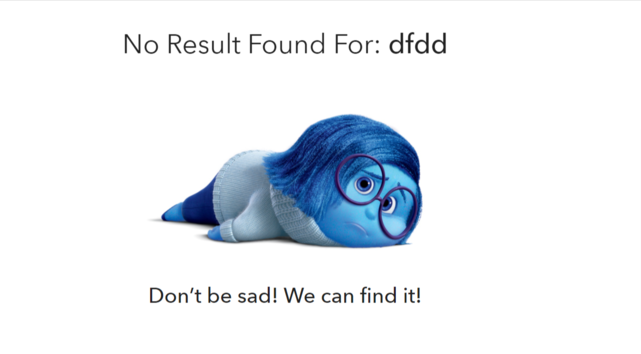
The quality of your copy can significantly impact how customers perceive your store. Instead of a cold, robotic “No Results Found” message, use helpful and engaging microcopy. Phrases like, “Did you mean…?” or “Check out these popular items instead!” can dramatically improve how customers interact with your store during this critical moment.
7. Build Connections and Collect Feedback
Give users alternative means to get in touch. Including a direct customer service number, links to a live chat, or an email sign-up form can give them confidence in your brand. It also provides an opportunity to collect valuable feedback on what users are searching for but can't find, helping you identify gaps in your product catalog or search functionality.

Real-World Examples of High-Converting No Results Pages
Leading e-commerce giants have mastered the art of turning "No Results" pages into conversion opportunities. Here are some examples that do an excellent job of turning dead-end results into actionable pages that enrich the user's experience.
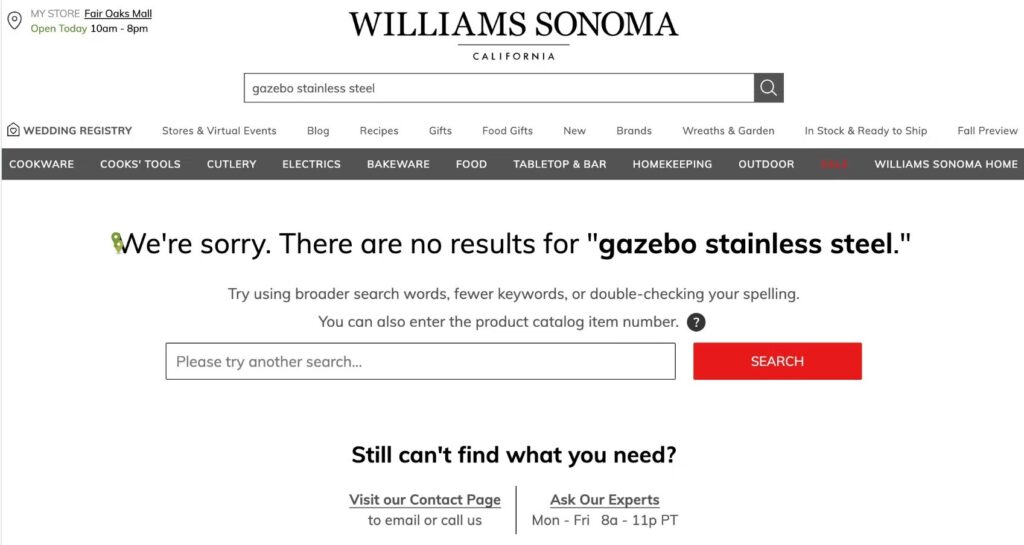
Williams Sonoma: Taking Responsibility
The brand outrightly takes responsibility and does not let you land at “no results” page. It always leaves you with some choice, by simply showing ~200 products, usually the simplest ones just to show you the overall idea of what can you find in store.
Gymshark: Keeping Users Engaged
Gymshark identified an opportunity to turn no result pages into valuable engagements. When users encounter a "No Results Found" page, they go beyond simply apologizing for the inconvenience by offering unique ways to keep users engaged. Gymshark ensures 24/7 customer service is easily accessible, allowing users to continue their journey, avoid frustration, and receive help that leads to results—all just a click away.

IKEA: Providing Inspiration and Alternative Categories
If a search doesn’t yield any results, IKEA ensures the customer is not left hanging. They provide suggestions for products the user might not even know they needed, allowing the customer to explore related categories or different items that match their preferences. This approach turns a potential dead end into an opportunity for discovery.

Louis Vuitton: Ensuring Support
This page does an awesome job of highlighting the possibility to call the Customer Service directly after getting “No results” page. . It even offers to assist you with your shopping needs if you contact the brand directly or visit one of its physical stores, blending the digital experience with high-touch customer service.

Frequently Asked Questions
What does “no results found” mean?
It means a shopper’s search returned zero matching products. The intent was there — they were looking for something — but the search couldn’t connect their query to a product, usually because of a typo, a synonym, an out-of-stock or unpublished item, or a field (like SKU) the search doesn’t index.
Why does Shopify search show no results when the product exists?
The most common reasons are: the product isn’t published to the Online Store channel, it’s out of stock and hidden, it isn’t in the search index yet, or the shopper searched a SKU — which Shopify’s native predictive search doesn’t index by default.
How do I fix no results on Shopify?
Confirm the product is active and published, check stock and index sync, enable SKU search, add synonyms and typo tolerance, and rule out app conflicts. See the step-by-step section above.
How do I let customers search by SKU on Shopify?
Shopify’s predictive search doesn’t index SKUs by default. Add variants.sku to your theme’s search fields, or use a search app that supports SKU search out of the box.
What should a good no-results page show?
Never a dead end. Show a clear explanation, a working search box, suggested or corrected queries, popular products, and links to relevant categories — so the shopper has an obvious next step.
Turn Search Failures into Sales Opportunities
Your no results page can be a conversion killer or a land of further possibilities. As a store owner, you understand the value of every single customer interaction. Don’t let a simple "No Results Found" page be the reason you lose a sale.
By understanding the common causes of search failure and implementing these best practices, you can transform these dead ends into new paths toward a purchase. Optimizing your website’s search and no results experience will engage visitors and help them navigate closer to conversion, even when they cannot find the specific item they came for.