Your Shopify store's search bar is one of two things: a high-powered conversion engine or a dead end for your customers. When shoppers can't find what they want quickly and easily, they don't just leave your site—they go to a competitor. The difference lies in moving beyond basic keyword matching and implementing a modern, intelligent product discovery experience.
This guide outlines 10 essential e-commerce search best practices designed to turn your search bar into your most valuable sales tool. Grounded in extensive usability research, these strategies explore how advanced technologies like Artificial Intelligence (AI), Natural Language Processing (NLP), and semantic search create a truly intuitive journey for your customers. We will cover critical features like Autocomplete, typo tolerance, and faceted navigation that reduce friction and guide shoppers from query to checkout.
What is product search in e-commerce and why it matters
Product search, often called site search or internal search, refers to the technology on an e-commerce platform that allows customers to find specific items. While its alternative is passive browsing or navigation, search is an active and direct expression of high purchase intent. In fact, this high-intent group is incredibly valuable: while only 15% of visitors might use site search, they can generate 45% of a store's total revenue. Modern search systems have evolved far beyond traditional keyword matching, which often fails to understand a user's true needs. Instead, they now utilize advanced technologies like AI, Natural Language Processing, and semantic search to interpret intent and deliver highly relevant results.
Effective product search is a critical component of the entire e-commerce technology stack because it is a primary driver of both product discovery and conversion rate optimization (CRO). The reasoning is simple: when a powerful search function enables shoppers to locate what they want quickly and effortlessly, it directly leads to a better user experience and higher customer satisfaction. This improved product findability reduces bounce rates—a common symptom of a frustrating "no results" page—and directly increases revenue, solidifying its importance as a core business tool.
How product search impacts user experience and conversion rates
An optimized product search has a profound and direct impact on user experience (UX), which is a primary driver of conversion rates. The relationship is a clear causal chain: a positive search experience reduces friction, and reduced friction leads to more sales. The negative impact is just as direct: research found that 80% of shoppers admit leaving a site specifically because of a poor search experience. This is where modern search best practices move from being mere features to becoming essential components of conversion rate optimization.
A positive UX is created when the search is fast, intelligent, and forgiving. Features like autocomplete, typo tolerance, and Natural Language Processing work together to interpret user intent rather than just matching keywords. This seamless interaction reduces shopper frustration and builds confidence, which directly leads to lower bounce rates. When a user's typo is automatically corrected or their conversational query is understood, they are kept on the path to purchase instead of hitting the dead end of a "no results" page.
This frictionless experience directly translates into higher conversion rates. When customers can find relevant products quickly using tools like faceted navigation to filter and sort results, they are far more likely to complete a purchase. In essence, an optimized search experience is the most efficient way to guide high-intent users from a simple query to the checkout, directly increasing product findability and revenue.
E-commerce search best practices include designing an intuitive UI, optimizing product metadata, and using faceted navigation. Key technical features involve implementing natural language processing (NLP) for smarter queries, enabling typo tolerance, offering autocomplete, and managing synonyms. Tracking search analytics to measure performance and continuously optimize is also critical for success.
1. Design intuitive search interfaces with UI/UX best practices
An intuitive search interface is the foundation of effective product discovery. While powerful algorithms work behind the scenes, the User Interface (UI) is the part of the system your customer actually interacts with. Based on extensive usability testing, best practices demand a clean, user-friendly design where the search bar is prominently visible within the website header, making it instantly accessible across all pages—especially on mobile devices where screen space is limited.
The interface should provide instant feedback. This isn't just a design preference; it's a revenue driver. Studies confirm that a one-second delay in page response time can slash conversion rates by 7%. As a user begins typing, features like Autocomplete should immediately suggest relevant queries and products, speeding up the process and guiding them toward a successful search. When results are displayed, they must be clear and scannable, featuring high-quality images, legible titles, and upfront pricing. By applying proven UI/UX principles like simplicity and consistency, you reduce the user's cognitive load, which prevents frustration and encourages exploration—both of which are essential for boosting engagement and conversions.
2. Optimize product metadata for accurate search results
Product metadata—which includes titles, descriptions, attributes, and tags—is the backbone of accurate search results. It is the raw product data that your search engine's ranking algorithm consumes during indexing to understand what you sell. Without clean, comprehensive, and well-structured metadata, even the most advanced AI is essentially flying blind.
Optimizing this data is what powers everything from basic keyword matching to the most valuable features in modern e-commerce. For example, effective Faceted navigation is impossible if your products lack the detailed and consistently formatted attributes needed for filters. Similarly, true semantic search relies on rich descriptions and context to understand user intent. To optimize, ensure all product attributes are detailed, use descriptive language that includes relevant synonyms, and maintain consistent formatting. Regular data audits are essential to maintain this quality, ensuring precise results that reduce bounce rates and improve conversions.
3. Offer faceted navigation and effective filtering options
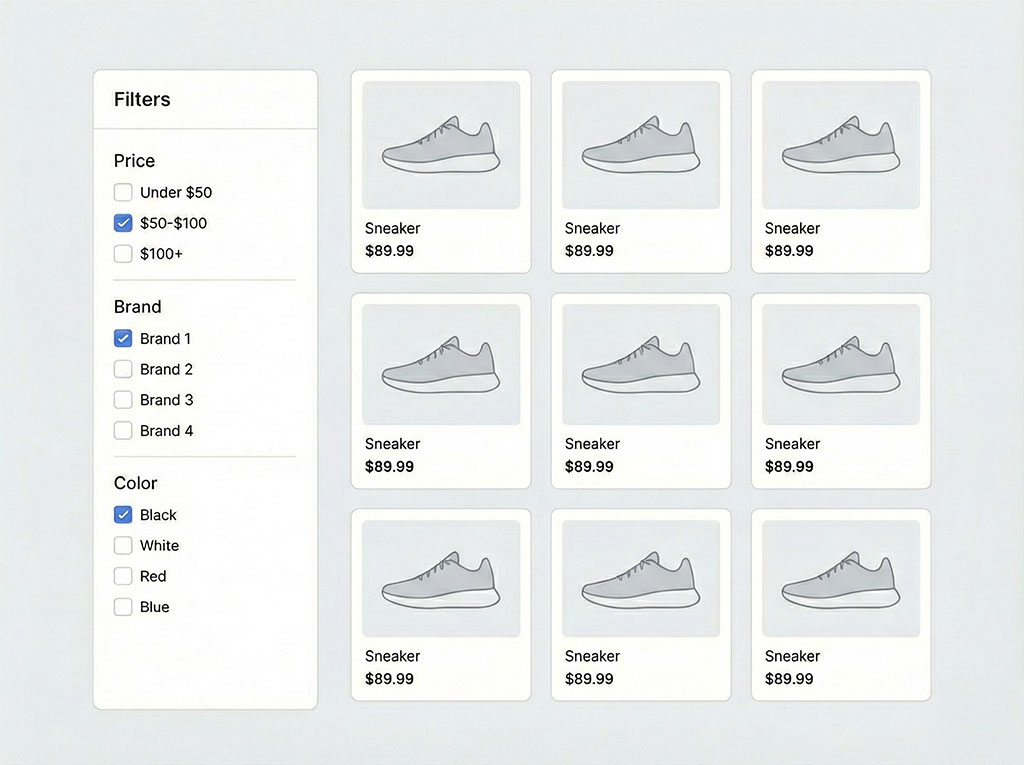
Empowering customers to refine their own search results is a cornerstone of a good user experience. This is achieved through a powerful system of filtering options, commonly known as Faceted navigation. By giving users control to sort broad results based on specific attributes like price, brand, size, or color, you drastically reduce their decision fatigue, which is crucial when they are faced with a large catalog of items. Failing to provide this control is a direct cause of site abandonment; research found that 27% of shoppers have left a site because the results showed too many options and it wasn't possible to narrow the search using appropriate filters.
Best practices demand a system that feels both intuitive and responsive. This means organizing filters logically in a sidebar or header, prioritizing the most commonly used attributes at the top, and ensuring that the results update instantly without a full page reload. An effective filtering system is essential on all devices, but it's particularly critical for mobile optimization, where screen space is limited and users expect quick, frictionless interactions. Ultimately, faceted search is a key feature that guides users efficiently from a broad query to a specific product, directly leading to a purchase decision.
4. Implement natural language processing for smarter query interpretation
Moving beyond the rigid limitations of traditional keyword search requires teaching your search engine to understand human language. This is the core function of Natural Language Processing (NLP), an advanced field of AI. Instead of simply matching the exact words a user types, a search engine integrated with NLP can interpret user intent, context, and conversational phrases.
This technology makes the search experience feel far more intelligent and helpful. It is the engine that powers more intuitive features like smarter autocomplete suggestions and effective typo tolerance. By understanding that "summer dresses" implies lightweight fabrics or that a user might ask a full question, NLP reduces user frustration and ensures that a simple difference in phrasing doesn't lead to a dead-end "no results" page.
5. Apply semantic search techniques for improved relevance
A truly intelligent search goes beyond understanding language; it understands meaning. While traditional keyword search can only match the exact words a user types, semantic search elevates query interpretation by focusing on the context and intent behind the query. This is the key difference between the two systems: keyword search finds literal matches, while semantic search finds relevant results.
For example, instead of just looking for "blue floral dress," it understands related concepts and the user's likely intent, such as showing dresses with flower patterns in various shades of blue. By leveraging AI and analyzing user data, this technology results in far more relevant product suggestions. This focus on meaning is also a key enabler of hyper-personalization, as the search engine can begin to tailor results to an individual's unique shopping patterns. This is not just a minor improvement; survey found that 70% of consumers say they are likely to make a purchase if search results are personalized. The outcome is a more intuitive and satisfying product discovery process that directly leads to higher user satisfaction and increased conversions.
6. Adopt conversational and visual search interfaces
Beyond the traditional search bar, two emerging interfaces offer highly intuitive, alternative ways for users to find products. Both leverage AI to create richer and more convenient shopping experiences that cater to modern behaviors.
- Conversational Search: This approach typically uses an AI-powered chatbot to understand natural language. Instead of a one-way query, it creates an interactive dialogue, guiding users with questions and providing personalized recommendations much like a digital sales assistant. It's an excellent tool for customer engagement and complex product discovery.
- Visual Search: This powerful interface allows users to upload an image to find the same or visually similar products. It completely removes the friction of trying to describe a unique pattern, style, or item with words, turning a moment of inspiration directly into a shoppable result.
Adopting one or both of these interfaces can create a more engaging and highly convenient user experience, setting your store apart from competitors who rely solely on text search.
7. Implement autocomplete (search-as-you-type) for faster searches
This feature, often called "search-as-you-type," is a fundamental part of a modern search experience. More than just a convenience, Autocomplete is a powerful tool for guiding the user journey and preventing search abandonment before it even starts.
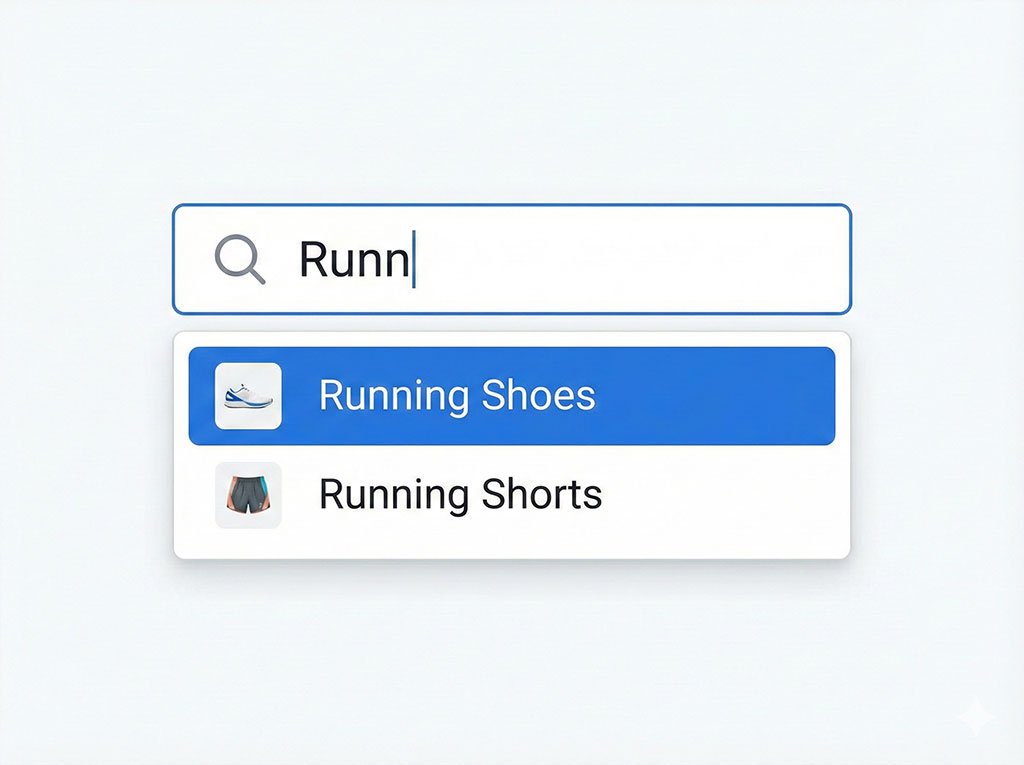
Its impact on user experience and conversion rates is immediate and multifaceted. It not only speeds up the search process but also actively reduces errors by guiding users toward valid and popular queries, minimizing the chance of hitting a "no results" page. This is one of the highest-impact features you can implement: studies show that adding search autocomplete can boost sales and conversions by as much as 24%. This directly contributes to higher conversion rates by keeping users engaged and moving them efficiently down the funnel. Advanced autocomplete can even suggest specific products and categories, creating a direct path to purchase right from the search bar.
8. Enable typo tolerance to handle misspellings
A simple typo should never be a dead end. Typo tolerance is a crucial, non-negotiable search feature that identifies and corrects misspellings in a user's query.
Its core function is to prevent failed searches caused by common human error. A "zero results" page is one of the biggest sources of user frustration and a primary driver of site abandonment, which translates directly to lost revenue. By automatically providing relevant results despite a mistake—for instance, showing results for "shirt" when a user types "shrit"—typo tolerance creates a forgiving and seamless experience. This simple but powerful mechanism improves search success rates, enhances user satisfaction, and keeps customers on the path to purchase.

9. Utilize synonym management to match customer language
Your customers don't speak in keywords; they speak in their own language. Synonym management is the process of teaching your search engine that different words can mean the same thing, bridging the gap between how you label your products and how shoppers look for them. This is essential because the vocabulary customers use is incredibly varied and often regional. One person's "handbag" is another's "purse." Without a robust synonym list, you risk showing a "no results" page to a high-intent customer simply because they used a different word.
The scale of this problem is massive: real-world site testing revealed that 81% of ecommerce websites display irrelevant items when shoppers search even simple two-word queries.
Consider these common examples:
- Sneakers vs. Trainers
- Sofa vs. Couch
- T-shirt vs. Tee
- Cap vs. Hat
By creating and managing a list of synonyms, you ensure your search engine can return a comprehensive and relevant set of products. This recognition of related terms is fundamental to improving search relevance and guaranteeing that shoppers find what they are looking for, regardless of the specific terminology they use.
10. Track and analyze search performance with key metrics and analytics
Optimizing your e-commerce search is not a "set it and forget it" task. The most successful stores adopt a data-driven approach, continuously tracking search performance through analytics to understand user behavior and identify opportunities for improvement.
To create a powerful feedback loop, you must monitor several key metrics that tell the story of how your customers interact with your search. The most critical ones include:
- Search Conversion Rate: The ultimate measure of success. What percentage of user searches directly result in a purchase?
- Search Exit Rate: How many users abandon your site immediately after performing a search? A high rate is a major red flag, often pointing to irrelevant results or a poor user experience.
- Click-Through Rate (CTR) on Results: Are users actually clicking on the products your search displays? Low CTR can signal issues with product imagery, pricing, or titles.
- Queries with No Results: Tracking what users search for that returns zero results is a goldmine of insight. It can reveal gaps in your product catalog, common misspellings you haven't accounted for, or customer language you need to add to your synonym list.
Analyzing these insights allows you to make informed decisions. This data empowers you to refine everything from your product metadata and UI design to the AI-powered ranking algorithms themselves, ensuring your search engine continuously evolves to meet customer needs.
Why Rapid Search is the comprehensive all-in-one search solution for Shopify
Implementing all ten of these best practices is a significant undertaking. As we established in Practice #2, optimizing your product metadata is the non-negotiable foundation of any great search experience. It's crucial to understand that no tool can magically fix product data that is inaccurate, inconsistent, or incomplete. If the data isn't there, even the most advanced AI cannot deliver relevant results.
However, once you commit to maintaining high-quality metadata, the challenge shifts from data management to complex technological implementation. This is where Rapid Search becomes an invaluable partner. It is an all-in-one growth engine designed for Shopify that handles the advanced technical heavy lifting, allowing you to unlock the full potential of your well-structured data.
It provides a complete suite of capabilities out of the box, including:
- AI-Powered Intelligence: Leveraging semantic search and Natural Language Processing.
- Essential UX Features: Advanced typo tolerance, synonym management, and high-speed autocomplete.
- Advanced Merchandising: Powerful faceted navigation and filtering options.
- Data-Driven Insights: A comprehensive analytics dashboard to track performance and user behavior.
By providing the sophisticated AI and machine learning layer on top of your data, Rapid Search transforms your search bar into a high-conversion tool. It empowers merchants to enhance the user experience and drive predictable business growth without requiring a dedicated team of developers.